Moving over from Dynamic Product Options? You don't have to rebuild anything by hand.
1. Export from DPO
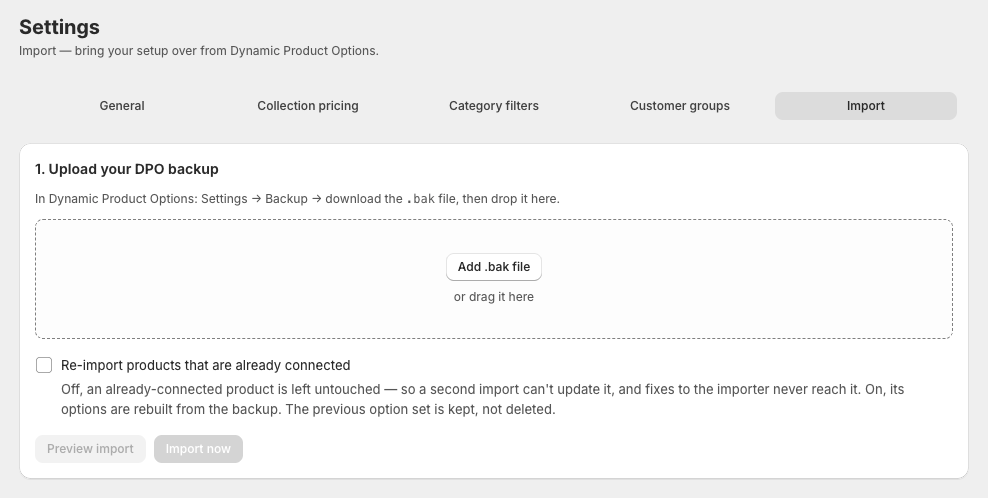
In Dynamic Product Options, go to Settings → Backup and download the backup — a .bak file.
2. Import here
In this app: Settings → Import → drop the file in → Preview import. You'll see exactly what's inside: templates, product connections, pricing rules, validation blocks and customer groups — plus review notes for anything that needs a look. Then click Import now.
What comes over:
- Templates — every section, option and choice, with images, HTML tooltips, comments, defaults, required flags, prices and SKUs. Radio/dropdown/image/text/file field types map to their equivalents automatically.
- Pricing formulas — translated into our formula language, including size math and "when this choice is selected" logic. They import as drafts: nothing touches your storefront until you review and publish.
- Disallow rules — become validation blocks with their original messages.
- Products — reconnected by their Shopify product IDs (same-store migrations reconnect automatically; products already connected here are left untouched).
- Customer groups — created as tag-based groups; the import notes which customers to tag.
3. Review and go live
- Open each imported template → Pricing → use the test panel on a few known configurations and compare against your old prices → Publish.
- Spot-check a product or two with Preview on the Products page.
- In the theme editor, remove the DPO blocks and add ours (Home → setup checklist has a one-click button).
The import report flags anything it couldn't translate perfectly (rare — mostly exotic formula attributes), so you review a short list instead of everything.